Clients:

Smart Payment Solutions

Category:

Bespoke Software Tool

POS Asset Generator — A Bespoke Product-Image Tool for a Card Payments Business

Client: Smart Payment Solutions · Paul Huxley · Bespoke Internal Software Tool

1 | Brief

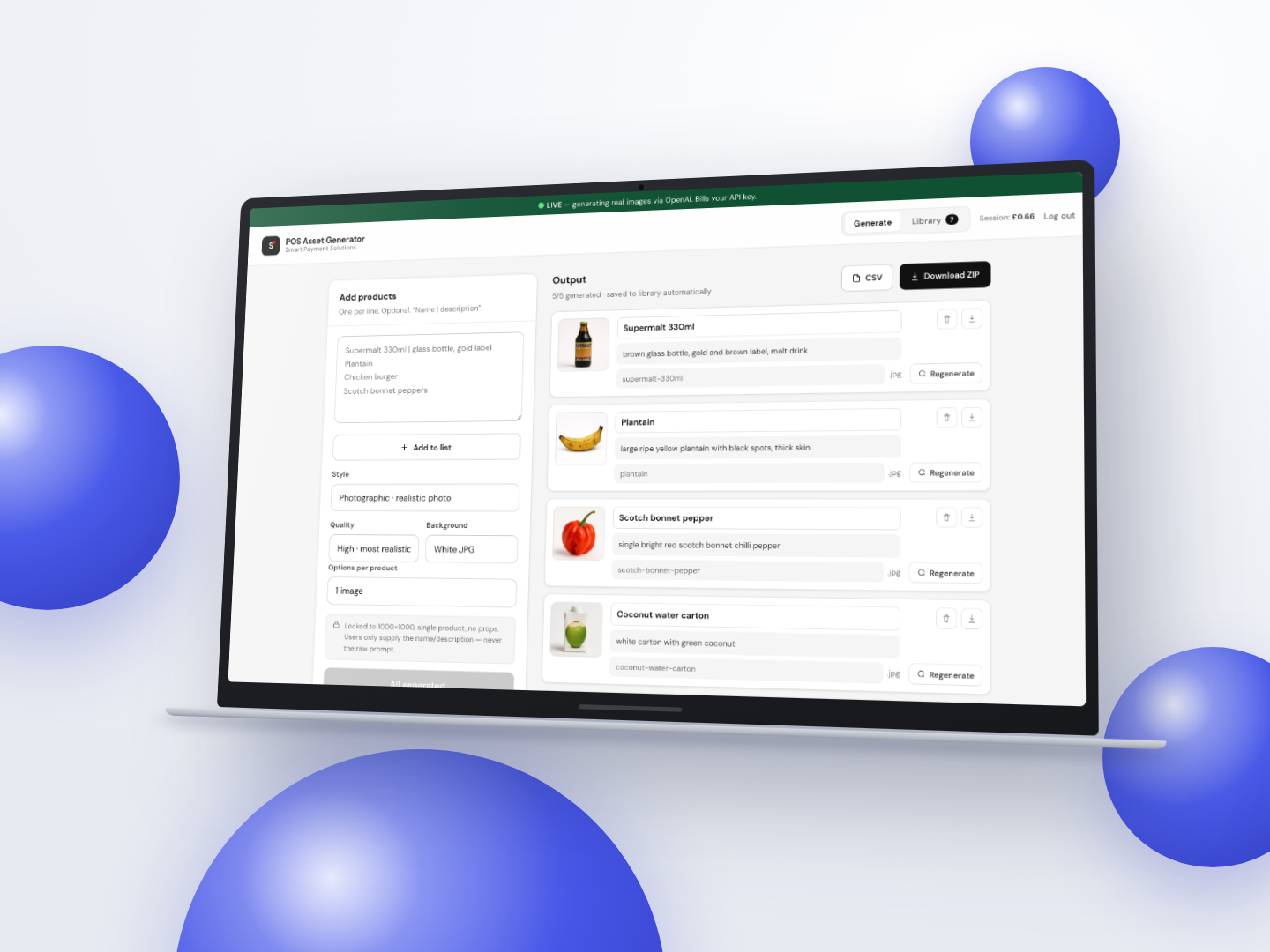
Paul Huxley at Smart Payment Solutions was building up a library of product images for the till software he supplies to his customers. His existing method was to ask ChatGPT for around ten product images at a time. It would hand back a single collage with all ten products spaced out on one picture, and he would then cut each product out by hand before it could be loaded onto a till button. It worked, but it was slow, fiddly and inconsistent.

What he actually needed was the opposite of a collage: one image per product, every one built to the same fixed format, saved as its own file and named after the product. The written spec was specific — 1000×1000, product centred, plain white background, no props, filenames generated from the product name, a CSV mapping each product to its file, and the whole batch downloadable as a ZIP.

This was delivered as a fixed-scope, fixed-price software build, entirely separate from the Smart Payment Solutions website so that nothing about the tool could affect the live business site. Paul supplies his own OpenAI key and pays for image generation directly, so there is no cost sitting between him and the tool. Ownership of the underlying code is retained by lukeduff.co.uk with the client licensed to use it.

2 | Key Goals

  • Remove the manual cut-out step completely — one saved file per product, never a collage.
  • Accept the input Paul already has, whether that is a pasted list of product names or a spreadsheet export.
  • Hold every generated image to the same fixed spec so the results stay consistent batch after batch.
  • Name every file automatically from the product name and produce a CSV mapping product to filename.
  • Package a full batch as a single ZIP so a run ends with one download rather than dozens.
  • Make the running cost visible and adjustable before any money is spent.
  • Keep the tool private to Paul and keep his API key off the server entirely.

3 | Solution Snapshot

Problem Solution Implemented
Ten products came back as one collage that had to be cut apart by hand Built a batch generator that calls the image API once per product, so each product returns as its own separate file ready to load straight onto a till button. Individual products can also be regenerated on their own without rerunning the whole batch.
Output format and file naming had to be consistent, not left to whatever the model felt like The image instructions are assembled server-side and locked, so the user only ever supplies a product name and an optional description — never a raw prompt. Filenames are slugified from the product name automatically, and the CSV map, ZIP writer and slugger were all written from scratch rather than pulled in as third-party libraries.
No way to know what a batch would cost before running it Added a live cost estimate that updates as the product list is built, plus three selectable quality tiers. The cheapest Draft tier works out at roughly a penny an image against roughly thirteen pence on High — around a fifteenfold spread, made visible in the dropdown so the choice is an informed one.
Paul asked whether he could import a spreadsheet instead of retyping his product list Added CSV upload with a dependency-free parser that handles quoted fields with embedded commas, escaped quotes, mixed line endings, a UTF-8 byte order mark and an optional header row, and falls back to the simpler pipe format. Shipped a downloadable CSV template alongside it so the column order is never in question.
The OpenAI key is a live billing credential and must not sit on a server The key is encrypted with AES-256-GCM and held in an httpOnly cookie in Paul’s own browser — the server never stores it. Access is gated by a passphrase check in edge middleware before any generation endpoint is reachable, and the app carries in-product guidance on setting a hard monthly spend cap on the key itself.
A private tool still has to survive being reachable on the public internet Hardened in-house rather than bolting on a third-party access product: security headers, a noindex policy, constant-time passphrase comparison, and a durable rate limiter backed by object storage so it keeps counting across serverless cold starts. An independent black-box then authenticated penetration test passed 40 of 40 checks, including a critical authentication bypass that was caught and fixed during testing.

4 | Impact

  • Paul now goes from a pasted list or an uploaded spreadsheet to a set of individually named product images in a single pass, with the manual cut-out step removed from the job entirely.
  • Generated images save automatically to a cross-device cloud library, so a batch survives a cleared browser cache or a change of machine rather than living only on one laptop.
  • Exposing the quality tiers put cost control in his hands — he can run a cheap draft pass to check a product looks right before spending on a higher-quality version.
  • Answering his follow-up questions with working features rather than an email reply meant CSV import, the cheapest tier and an import template all shipped inside the tool.
  • The build was security-tested independently before handover and passed every check, which matters for a tool that holds a billing credential for someone else’s account.
  • Overall it is a good example of a bespoke internal tool doing what off-the-shelf AI could not — taking a repetitive manual job out of a business owner’s week and replacing it with one predictable, repeatable process.
Need a tool like this building? Get in touch →

What are you waiting waiting for?

Start Your Project Today
Book a FREE Call
footer shape